GTA 6 stream overlays | Three neon coast packs for your streams
Three GTA 6-inspired stream overlays with Starting soon, BRB, in-game, chat and transition scenes, plus matching alerts. Horizontal and vertical.
By Dznir
In short: a GTA 6 stream overlay should look like the game before the game is even on screen: neon, a sunset coast, palm trees. Dznir’s Overlay Studio has three GTA 6-inspired overlays, Neon Glow, Midnight Coast Drive and Midnight Coast · Illustrated, each with every scene you need, in horizontal and vertical, with matching alerts.
When GTA 6 goes live on your channel, the first thing viewers see isn’t the game, it’s your overlay. A plain grey “Starting soon” card doesn’t match a neon coast at sunset. So we made three stream overlays that do, and you can set one up in five minutes in your browser.
Start free on Dznir
Dznir is an all-in-one creator tools platform for creators, influencers and businesses: link in bio, stream overlays, stats, media kits and brand deals in one account. Claim your name now.
What’s in a GTA 6 stream overlay pack
Each overlay is a full set, so the whole stream looks like one show, from the countdown to the goodbye:
- Starting soon, Be right back and Ending screens with a live countdown and up to three socials.
- In-game: a webcam frame and a slim socials bar that stay out of the action.
- Camera + chat for the talking parts of the stream.
- Only camera: a clean see-through layer, with a frame if you want one.
- A transition (a stinger) in the overlay’s own style, to cut between scenes.
- Matching alerts for new followers, members, Super Chats and raids, in the same lettering, in Stream Kit.
Every overlay comes in horizontal (16:9) for YouTube, Twitch and Kick, and vertical (9:16) for vertical live streams on phones. The backgrounds move (waves, traffic, city lights) and loop seamlessly, while the titles stay still and readable.

Neon Glow: a neon sunset over the water
A pink and purple sunset over the sea, palm trees in the corners and a city skyline glowing on the shore. The “Starting” title is in chunky neon lettering with a soft glow, and the water keeps moving under it. If you want the full neon sunset look, this is the one.
Neon Glow can also show a big GLOW behind your Camera + chat scene and in its transition. Both are off by default, and you switch them on in the Studio.

Midnight Coast Drive: a night drive down the coast
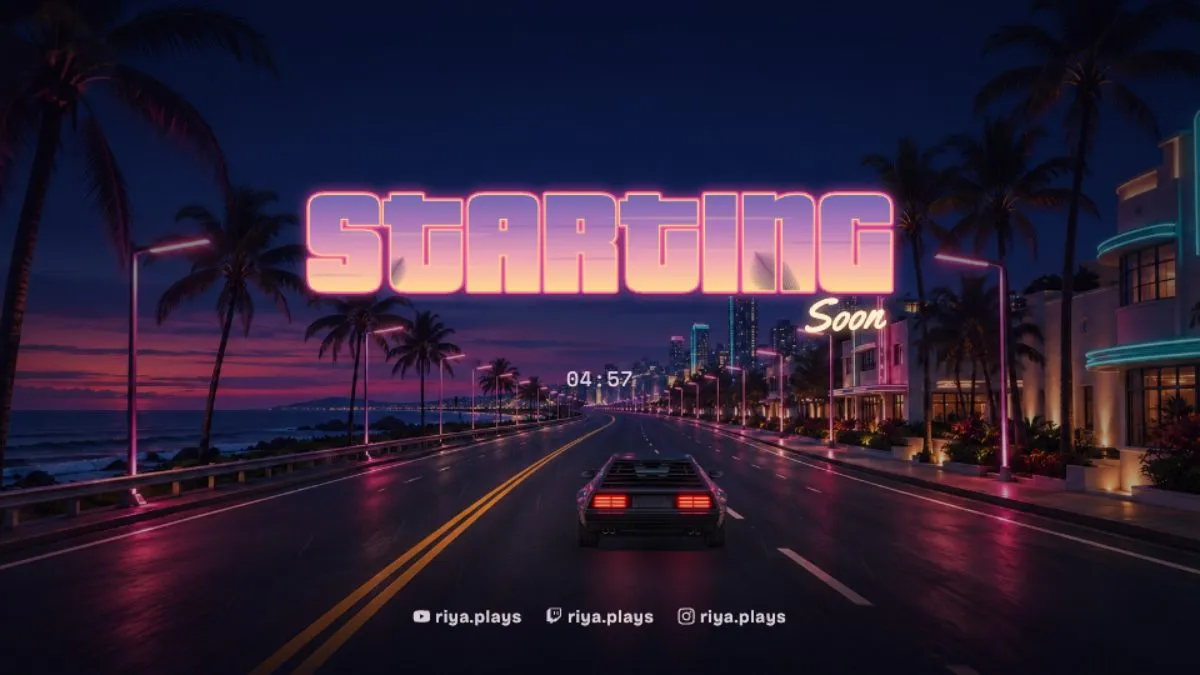
A car on an empty coast road at night, neon hotels on one side and the sea on the other, street lights sliding past. It’s calmer than Neon Glow, which makes it a good fit for night streams, chill sessions and long free-roam runs.
Midnight Coast · Illustrated: a hand-drawn poster
The same coast, drawn by hand: a big sunset, a sports car and pink art-deco hotels, with sunset-chrome lettering and a gold script line under it. It’s the most poster-like of the three, and it stands out in a list of streams.

How to add a GTA 6 overlay to OBS or Streamlabs
Everything happens in your browser in Overlay Studio, with no software to install:
- Pick an overlay. Open Overlay Studio in your Dznir dashboard and tap Neon Glow, Midnight Coast Drive or Midnight Coast · Illustrated.
- Make it yours. Type your lines, set the countdown, add up to three socials and choose where your camera sits.
- Choose the extras. Turn the transition, the big mark and the socials pop-ups on or off, and pick horizontal, vertical or both.
- Download or link. Download every scene as videos and pictures, or copy a live link (with Dznir Pro) that updates by itself when you change something.
- Add it to your streaming app. In OBS, Streamlabs or any streaming app, add each scene as a media source (downloads) or a browser source (live links), and the transition as a stinger.
Want the alerts to match? Open Stream Kit → Alerts and pick the overlay’s own alert card: new followers, members, Super Chats and raids then pop up in the same style.
Tips for a GTA 6 stream that looks the part
- Start with a countdown. Five minutes on the Starting soon screen gives viewers time to arrive and say hi in chat.
- Use the transition between Starting soon and the game. It’s a small thing that makes a stream feel produced.
- Keep In-game clean. The game is the show: a small camera and one socials bar are enough.
- Going vertical? Use the 9:16 version, so phone viewers don’t get black bars or a squashed title.
- Put one link in your bio. Viewers who find you from a clip need one place for your schedule, socials and Discord. Our guide to a link in bio for streamers shows how to make yours show when you’re live.
Exclusive: buy once and it’s yours
All three are Exclusive overlays: you buy each one once and keep it, on any plan, at a price shown in your own currency in Overlay Studio. You can customise and preview them for free before you buy. If you’d like to try Overlay Studio first, the Red graffiti overlay is free to download and use on stream.
These overlays are original, fan-made designs inspired by the look of GTA 6. They aren’t made or approved by Rockstar Games or Take-Two Interactive.
Questions people ask
Where can I get a GTA 6 stream overlay?
In Dznir’s Overlay Studio. Neon Glow, Midnight Coast Drive and Midnight Coast · Illustrated are GTA 6-inspired overlays with Starting soon, Be right back, Ending, in-game, Camera + chat and transition scenes, in horizontal and vertical. You customise one in your browser, then download it or use it as a live link.
Is this an official GTA 6 overlay?
No. These are original, fan-made designs inspired by the look of GTA 6. They aren’t made or approved by Rockstar Games or Take-Two Interactive.
Does a GTA 6 overlay work with OBS and Streamlabs?
Yes. Download the scenes as videos and pictures, or copy a live link, and add them to OBS, Streamlabs or any streaming app as a media or browser source.
Can I use a GTA 6 overlay for vertical streams?
Yes. Every overlay has a 9:16 vertical version for streaming to phones, with its own layout, so nothing gets cut off.
Is there a free GTA 6 stream overlay?
The three GTA 6-inspired overlays are Exclusive: you buy each one once and keep it, on any plan, at a price shown in your own currency. You can customise and preview them for free first, and Red graffiti is free to download and use on stream.
Do I need Dznir Pro?
No, not to buy and download one. Live links, overlays that update by themselves when you change something, come with Dznir Pro.
Put it into practice
Dznir is an all-in-one creator tools platform for creators, influencers and businesses: link in bio, stream overlays, stats, media kits and brand deals in one account. Claim your name and have your page ready in five minutes.
Keep reading
 Link in bio for streamers | Show you’re live on Twitch, YouTube and KickA link in bio for streamers that shows you’re live by itself: what to put on it for Twitch, YouTube and Kick, and a free setup in five minutes.
 Dznir vs Linktree | An honest comparison for everyoneDznir vs Linktree compared for small and big creators: prices, free plans, payments, media kits, themes and layouts. Plus where Linktree wins.